


ReShoot: AI Photos & Edits
4.6265.00 Reviews
App Specs
- Version
- 1.4.2
- Updated On
- License
- Free
- Downloads
- 100,000+
- Developer
- HubX
- Categories
- Lifestyle
- Platform
- Android
Screenshots
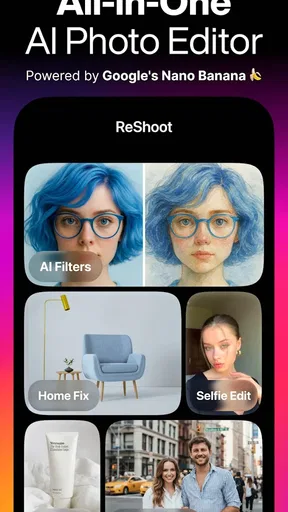
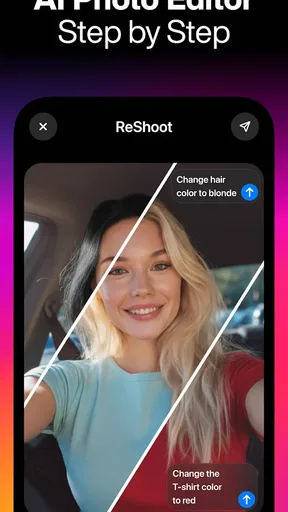
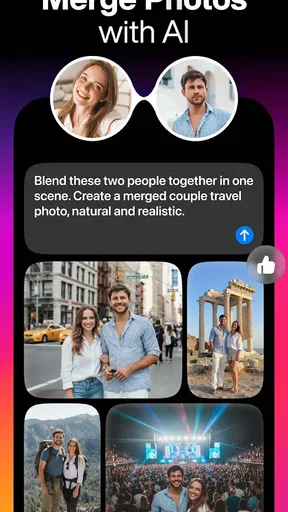
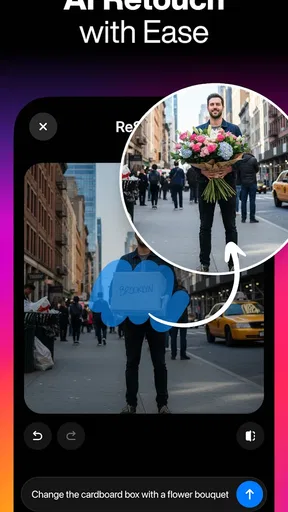
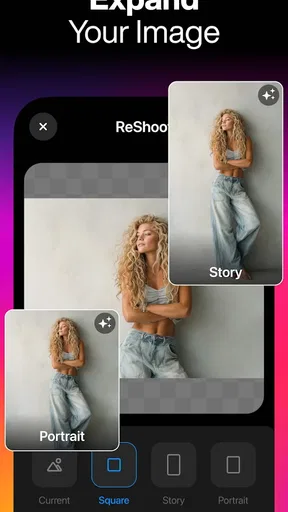
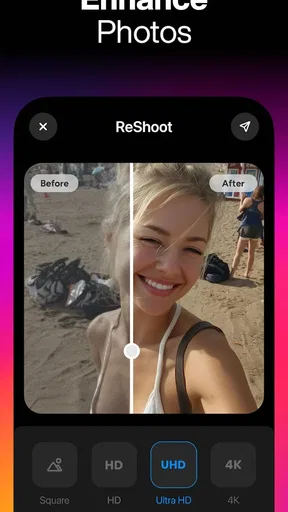
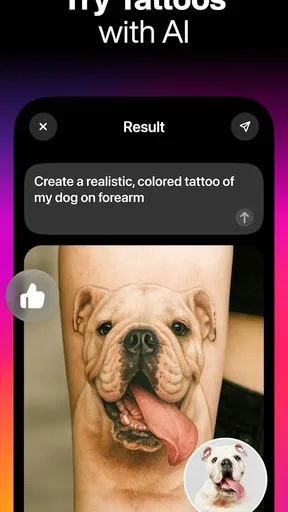
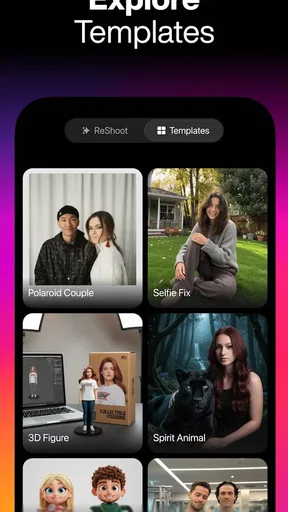
 Analysis by AppCompare
I approached ReShoot: AI Photos & Edits as a practical lifestyle editor rather than a novelty camera. Its appeal is easy to understand: instead of opening several separate tools for a portrait adjustment, a playful filter, a tattoo preview, a hairstyle experiment, or a more polished profile image, I can begin in one place and decide how far I want to transform the original. That makes it especially interesting for people who regularly prepare photos for social profiles, messaging apps, invitations, or personal projects.
The app is free to install and is made by HubX. It has an Everyone content rating, so its general presentation is intended for a broad audience. The current release is version 1.4.2, and it supports devices running OS 9 or later. Those details matter because AI photo editing can feel very different depending on the phone: a recent device may make the process feel comfortable, while an older compatible model may require more patience during image processing.
My overall impression is that ReShoot works best when I treat it as a fast idea generator and finishing tool, not as a complete replacement for a traditional photo editor. It is designed around visual changes that are easy to understand, and that lowers the barrier for casual users. At the same time, anyone expecting exact professional retouching controls, fully predictable AI results, or unlimited experimentation without spending money should approach it with more caution.
How ReShoot fits into everyday photo editing
I find ReShoot most useful when I treat it as a place to explore a photo’s possibilities, rather than as a trusted archive or a full editing suite. That distinction matters when an image is personal: I can decide what to try, keep the original separate, and pause before sharing a transformed version. Next, I’ll look at the choices that shape that workflow and the moments when I’d be especially deliberate.
A broad lifestyle toolkit in one app
The strongest part of the concept is the range of situations it covers. ReShoot can be useful when I want to see how a different hairstyle might look, test the visual impact of a tattoo, create a stylized portrait, or make an ordinary picture feel more deliberate. These are different goals, but they share the same starting point: I have an existing image and want to explore a new version without learning a complicated desktop editor.
That makes the app more approachable than a conventional editing suite full of sliders and technical terms. I do not need to understand masking, layers, or color curves before trying an idea. For a person who normally applies one filter and stops, the AI-oriented approach offers more room to experiment. The trade-off is control. A traditional editor is usually better when I need a specific crop, a precise skin-tone adjustment, or a carefully repeatable result across a whole set of photos.
In my experience, the most useful mindset is to begin with a clear purpose. If I am preparing a profile picture, I look for a restrained result that keeps my face recognizable. If I am making something for entertainment, I can accept a more dramatic transformation. This distinction prevents the common disappointment of asking an expressive effect to behave like a natural retouch.
Worth Reading Before You Choose

Flipboard Shows What News Apps Must Do Beyond the Feed

Switching to Android Auto Means Rethinking Your Driving Routine

Google Calendar Makes a Crowded Week Easier to Manage

Ludo King Makes the Most of the Minutes Between Plans

Baby Panda World Brings Quick Play to Modern Phones, but Its Game Library Feels Busy

ESPN’s Live Game View Makes Following Close Games Easier
What a normal use session feels like
A realistic scenario would be preparing a new profile image before updating a messaging account. I might choose a well-lit portrait, try a professional-looking treatment, compare it with a softer edit, and keep the version that still looks like me. The useful part is not simply producing a polished image; it is being able to compare different directions without first becoming an expert in image editing.
For a hairstyle preview, I would recommend using a front-facing photo with the head clearly visible and minimal obstruction around the hair. For a tattoo concept, a clean view of the intended area should give the effect a better chance of looking convincing. These are not guaranteed rules, but they are sensible ways to reduce confusing results. AI editing cannot recover detail that is hidden by shadows, hair, hands, or a busy background.
One practical tip is to keep the untouched original. I prefer duplicating a photo before experimenting, especially when an edit is meant for something important. That lets me compare the transformation honestly and return to the source if the result changes facial details, clothing edges, or the surrounding scene in a way I did not intend.
Speed expectations and the role of the phone
AI editing is different from applying a simple brightness adjustment. The phone may need to prepare the image and process a more involved visual change, so I would not judge the app solely by the first tap. Perceived speed is likely to depend on the complexity of the chosen effect, the size of the source image, and the capability of the device. A recent phone should be the more comfortable environment, while an older compatible phone may make repeated experiments feel less immediate.
This is where the app’s minimum OS requirement becomes useful but not conclusive. Running OS 9 or later means a compatible device can install the app, but compatibility does not promise identical responsiveness across every model. If I were planning a long editing session, I would start with a smaller selection of photos rather than importing a large batch at once. That approach also makes it easier to spot which effect is actually worth continuing with.
Another small workflow improvement is to decide the purpose before generating several variations. AI tools encourage endless tapping because every result suggests another possibility. That can be fun, but it can also consume time and device resources without improving the final image. I get more value when I test one natural option, one creative option, and then make a decision instead of producing a pile of near-duplicates.
Heavy-use moments and resource awareness
The most demanding use case is not a single quick edit; it is a session involving many high-resolution images and repeated generations. If I am trying multiple hairstyles on several portraits, switching between tattoo concepts, and creating professional-looking versions afterward, the workload can become noticeably heavier than ordinary filter use. Even without assigning a specific performance measurement, it is reasonable to expect a longer wait than with a basic color preset.
I would also avoid judging a result while doing several other demanding tasks on the phone. Closing unnecessary apps, keeping enough free storage for exported images, and working from a stable, well-lit source are sensible habits for a smoother session. These steps do not change what ReShoot can do, but they reduce avoidable friction around the editing process.
A useful trade-off appears here: large source images may preserve more detail, but they can also make processing and saving feel less convenient on modest hardware. For a social profile or a quick message, a sensible camera image is often enough. I would reserve the largest originals for cases where the final image really benefits from extra detail.
Battery behavior is another reason to keep expectations practical. Repeated AI processing is more intensive than browsing a static gallery, so I would not plan an extended creative session when the phone is nearly empty. The app is better suited to focused bursts: choose a photo, explore a few directions, save the strongest result, and move on.
Reliability, recovery, and protecting the original
Reliability in an AI photo app is not only about whether it opens. It also includes whether the result follows the request, whether the subject remains recognizable, and whether I can recover gracefully from an unsatisfying generation. ReShoot is most dependable when I give it a clear, uncomplicated image. Crowded backgrounds, unusual poses, partial faces, and low light create more opportunities for an edit to look artificial or inconsistent.
That is why I see source selection as part of the app’s real workflow rather than a minor detail. A clean portrait gives the editor more useful information. A photo with a clear subject and enough space around it is easier to evaluate than a dramatic snapshot where the face is partly hidden. If the first result is poor, I would try a different original before assuming that every version of the effect will fail.
Recovery also means not overwriting the source. Keeping the original makes experimentation low-risk, particularly when an effect changes more than expected. I would save only the versions I genuinely like and label them mentally by purpose, such as profile, playful, or professional. This avoids confusing a heavily stylized image with the natural version I may need later.
When an AI edit looks almost right but not quite, I would resist endlessly regenerating the same image. Sometimes the problem is the input rather than the attempt. A better crop, a different expression, or a less complicated background can be more effective than repeating the same action. This is one of the less obvious lessons of using an AI editor: the quality of preparation often matters as much as the choice of effect.
Device constraints and practical expectations
ReShoot is available as a free app, which makes it easy to try before deciding whether it belongs in a regular editing routine. Its broad age rating also makes it approachable for casual household use. However, free access does not necessarily mean every creative path will be equally open. The app includes in-app purchases ranging from $2.99 to $69.99 per item, so I would pay attention to what is available without payment and what requires an upgrade before investing time in a particular workflow.
That pricing range is especially important for users who enjoy experimentation. A person who only needs one occasional profile image may find the free starting point sufficient, while someone who wants to explore many styles could encounter more purchase decisions. I would not assume that an attractive preview automatically means the entire editing experience is included at no cost. Checking the purchase prompt before committing to a long series of generations is a sensible habit.
The app’s device requirement also creates a clear dividing line. Anyone using OS 9 or later can meet the stated software requirement, but older hardware within that group may still feel less comfortable during repeated processing. If a phone has limited storage or struggles with other image-heavy apps, I would keep the session focused and export selectively rather than treating ReShoot as a permanent archive.
For privacy-conscious users, the most important practical decision is which images to choose. I would avoid uploading or editing someone else’s personal photo without permission, and I would think carefully before using sensitive images simply because an effect looks entertaining. That advice applies particularly to face-based transformations and appearance previews. The creative result may be temporary, but the image itself can still be personal.
Where it outperforms ordinary alternatives
Compared with the usual basic camera filters, ReShoot offers a more substantial change in direction. A standard filter can alter color, contrast, or mood, but it generally does not address a hairstyle concept, tattoo placement, or a professional portrait treatment in the same way. For someone who wants to explore identity and presentation rather than merely brighten a photo, that broader approach is the main reason to choose it.
Compared with a full manual editor, its advantage is speed of learning. I can focus on the visual outcome instead of building it from individual adjustments. That is valuable when I am making a quick decision or showing a friend several possible looks. The disadvantage is that AI interpretation can be less predictable. If I need exact boundaries, consistent branding, or a carefully controlled series of images, a manual editor remains the safer choice.
It also occupies a different space from a dedicated beauty camera. A beauty-focused app may be better for subtle complexion work and routine selfies, while ReShoot is more appealing when the desired change is conceptual: a new style, an altered presentation, or a more imaginative portrait. Choosing between them depends on whether I want refinement or transformation.
One of my favorite workflows is to use ReShoot for exploration and another editor for final housekeeping. I can generate the main concept here, then use a familiar tool to make a small crop, adjust the final framing, or prepare the image for a particular platform. That division of labor avoids forcing one app to handle every stage and keeps the AI portion focused on what it does best.
Who will enjoy it, and who should skip it
I would recommend ReShoot to casual creators, people refreshing their online profile, users curious about hairstyle or tattoo ideas, and anyone who wants a more dramatic alternative to ordinary filters. It is also a good fit for someone who finds professional editing software intimidating. The combination of AI photos, edits, filters, and portrait-oriented transformations gives a beginner several approachable entry points.
I would be more cautious recommending it to photographers who need pixel-level control, businesses that require identical edits across a catalog, or users who dislike subscription-style or purchase-based creative limits. It may also disappoint someone who expects every result to preserve facial identity perfectly. AI images can be persuasive, but they are still interpretations, and a visually attractive result may include details that were not present in the original.
People using an older phone should try a small edit first rather than planning a large project. That gives them a realistic sense of waiting, storage use, and how comfortable repeated processing feels on their specific hardware. The same advice applies to anyone with limited patience: the app’s value depends on whether the creative possibilities outweigh the pauses between attempts.
My final performance verdict
After considering the complete workflow, I see ReShoot as a flexible AI photo companion with its best results in short, purposeful sessions. It is not merely another filter collection, because its appeal comes from changing the visual direction of a portrait and helping me imagine alternatives quickly. The experience is strongest when I use clear source photos, keep the original safe, and approach each effect with a specific goal.
Its main limitations are equally clear. Processing-heavy experimentation may be less comfortable on modest devices, AI results can require retries or better source images, and the free entry point sits alongside in-app purchases from $2.99 to $69.99 per item. Those factors do not make the app a poor choice, but they do mean I would explore the available workflow before relying on it for a large project or assuming every option is included.
The app has built a solid audience, with an average rating of 4.6 from around 4.4 thousand ratings and more than 100 thousand installs. That gives it useful early credibility, while the release date of September 8, 2025, also places it among relatively new tools that may continue to evolve. I would treat those figures as encouraging rather than as a guarantee that every edit will suit every face or device.
My recommendation is simple: try it if you want quick visual experiments that go beyond color filters, especially for portraits, style ideas, and profile images. Keep a manual editor nearby when precision matters, start with a good original, and watch the purchase prompts before building a large workflow. ReShoot is most convincing as a low-friction way to explore what a photo could become, not as a substitute for careful professional retouching.
For me, that is a worthwhile role. The app makes creative changes approachable, gives everyday photos more possibilities, and can save time at the idea stage. If your priority is playful discovery and fast portrait concepts, I think it is worth trying. If your priority is exact control, batch consistency, or predictable natural retouching, a conventional editor will probably serve you better.
Pros
- Creates polished AI portraits from a small set of uploaded photos.
- Offers creative styles for social posts
- profiles
- and personal projects.
- Simple interface makes most edits accessible to beginners.
- Previewing results is quick
- reducing time spent on experimentation.
- Useful for refreshing old photos with modern visual treatments.
Cons
- High-quality results may require a paid subscription or extra credits.
- AI-generated faces can occasionally look unnatural or inconsistent.
- Uploading personal photos raises privacy and data-handling concerns.
- Results depend heavily on the quality and variety of source images.
- Some styles may feel repetitive after extended use.
FAQs for ReShoot: AI Photos & Edits
What is ReShoot: AI Photos & Edits used for?
ReShoot: AI Photos & Edits is an AI-powered photo editing app designed to help users transform, enhance, and creatively rework images with automated tools. Depending on the available features, you can typically improve portraits, change visual styles, remove or replace elements, and create more polished social-media-ready pictures without needing advanced editing experience.
Is ReShoot: AI Photos & Edits easy to use for beginners?
The app is aimed at users who want quick results rather than a complicated professional editing workflow. Most AI tools generally work by selecting a photo, choosing an effect or describing the desired change, and waiting for the result. However, the quality of the final image can depend on the original photo, the clarity of your instructions, and the specific feature being used.
Does ReShoot: AI Photos & Edits require an internet connection?
Because AI photo generation and advanced editing often rely on remote processing, an internet connection may be required for many of ReShoot’s main features. Basic actions, if available offline, may vary by version and device. Before downloading or subscribing, users should check the app’s current store description and test whether mobile data usage is acceptable for their editing habits.
Is ReShoot: AI Photos & Edits free to download and use?
ReShoot may be available as a free download, but some editing tools, export options, premium effects, or higher-quality results can be restricted behind in-app purchases or a subscription. Pricing and trial conditions may differ between Android and iOS and can change over time. Review the payment screen carefully before confirming any trial or recurring plan.
Are photos uploaded to ReShoot: AI Photos & Edits private and secure?
Before using the app for personal, family, or sensitive images, it is important to review ReShoot’s privacy policy and the permissions requested on your device. AI editing may require photos to be uploaded for processing, and retention or deletion practices can vary. Avoid submitting confidential images unless you understand how the service handles, stores, and protects your content.


